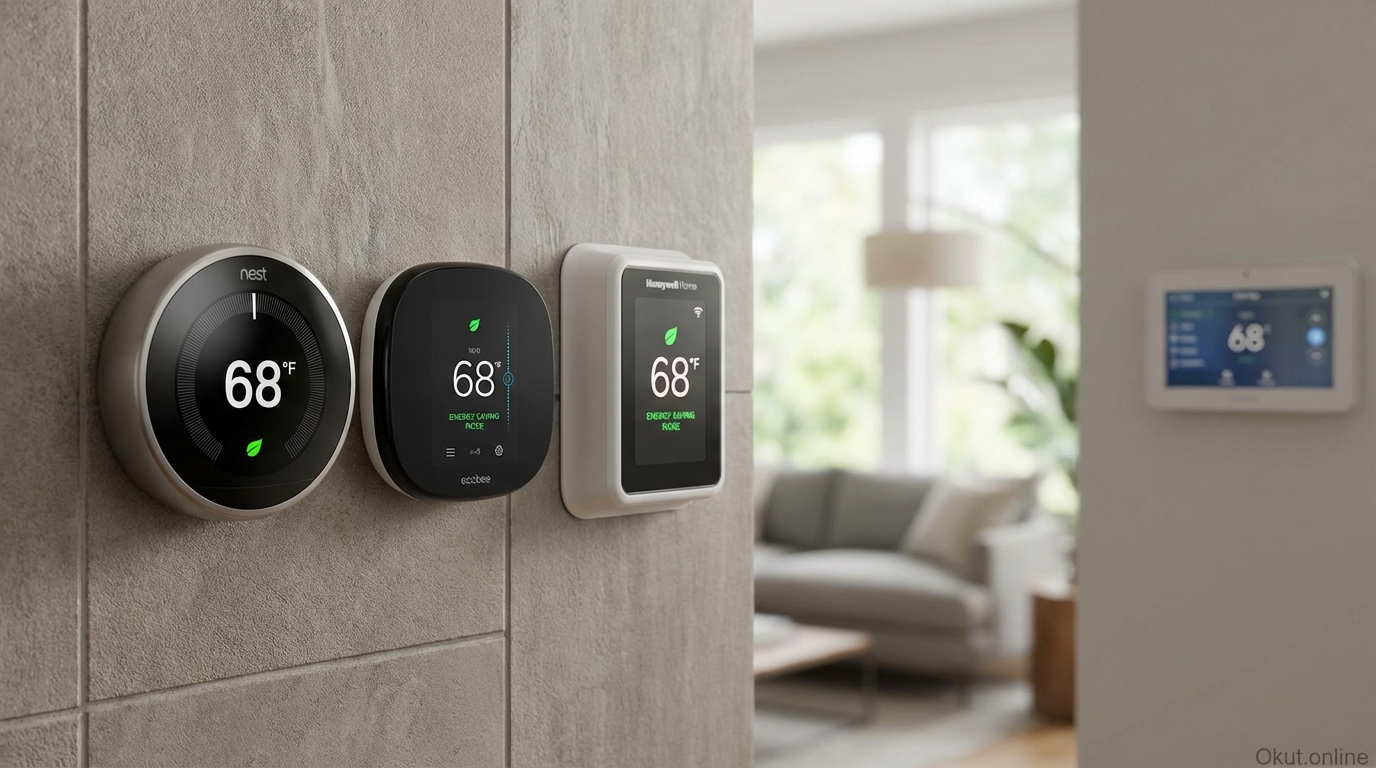
Smart thermostats have evolved from simple programmable timers into intelligent climate management systems that learn your preferences, adapt to your schedule, and integrate with broader smart home ecosystems. In 2026, the competition between Google Nest, Ecobee, and Honeywell Home delivers sophisticated options at various price points, each with distinct approaches to comfort optimization and energy efficiency. This comprehensive comparison examines learning capabilities, sensor systems, smart home integration, and real-world energy savings to help you select the thermostat that best matches your home and lifestyle.
I. How Smart Thermostats Save Energy
Before comparing specific products, understanding how smart thermostats achieve energy savings helps you evaluate which features matter most for your situation. The energy-saving mechanisms vary between products, and knowing what drives savings helps you choose appropriately.
A. Learning Algorithms
Learning thermostats observe your manual adjustments over time and identify patterns in when you want heating or cooling and at what temperatures. Rather than programming schedules yourself, the thermostat builds schedules automatically based on your demonstrated preferences.
Initial learning periods typically span 1-2 weeks, during which you should adjust the thermostat manually whenever you’re uncomfortable. The thermostat notes what time adjustments occur, what temperatures you prefer for different times of day, and how these patterns differ between weekdays and weekends.
After the learning period, the thermostat anticipates your needs. If you consistently turn up heat at 6:00 AM, it starts warming the house at 5:45 so your target temperature is reached when you wake. If you always reduce cooling when leaving for work, it learns to do that automatically at the right time.
The energy savings come from precision that humans rarely achieve with manual control. You might forget to adjust temperatures when leaving home, or you might remember but only after already wasting an hour of heating/cooling an empty house. Learning algorithms catch the consistent patterns you don’t consciously track.
B. Occupancy Detection
Smart thermostats use various methods to detect whether anyone is home, adjusting temperatures appropriately for occupied versus empty states.
Motion sensors built into thermostats detect activity in the room where the thermostat is mounted. When no motion is detected for extended periods (typically 30 minutes to 2 hours), the thermostat concludes the home is unoccupied and reduces heating/cooling to save energy.
Remote room sensors extend occupancy detection throughout your home rather than relying solely on the thermostat’s location. If the thermostat is in an infrequently-used hallway but sensors are in bedrooms and living areas, occupancy detection becomes much more accurate.
Smartphone geofencing uses your phone’s location to determine whether you’re home or away. When all registered phones leave the geofence area, the thermostat switches to away mode; when the first phone approaches home, it begins pre-conditioning for your arrival.
Combined approaches using both motion sensors and geofencing provide the most reliable occupancy detection. Mobile location catches departures and arrivals; motion sensors confirm that away mode is appropriate even if phones are left home.
C. Weather Response and Pre-conditioning
Smart thermostats access weather data to anticipate heating and cooling needs rather than simply reacting to current temperatures.
Weather forecasting integration adjusts system behavior based on predicted conditions. If the forecast shows warming afternoon temperatures, the thermostat might reduce morning heating knowing that natural warming will help maintain comfort. If cold weather is approaching, it might maintain more warmth to buffer against temperature drops.
Pre-conditioning calculates how long your system needs to reach target temperatures from current conditions, starting heating or cooling early enough to achieve comfort when you need it rather than when the schedule time arrives.
HVAC system learning helps the thermostat understand your specific equipment’s capabilities—how quickly it heats, how efficiently it cools, how conditions in your home respond to system operation. This equipment-specific knowledge improves timing precision for pre-conditioning and schedule management.
II. Google Nest Thermostat Family
Google’s Nest thermostats pioneered the modern smart thermostat category and continue leading in learning capabilities and Google ecosystem integration.
A. Nest Learning Thermostat (4th Gen) – $279
The flagship Nest Learning Thermostat represents the most sophisticated consumer thermostat available, combining advanced learning with premium industrial design.
Learning algorithms are the core feature distinguishing Nest from simpler programmable thermostats. The thermostat observes your adjustments, builds schedules automatically, and refines its understanding continuously. Most users find that after 2-3 weeks, the thermostat predicts their preferences accurately enough that manual intervention becomes rare.
Farsight display activates when you approach, showing current temperature, weather, or time in a format visible from across the room. The display turns on automatically without touching the thermostat, providing information conveniently as you walk by.
Home/Away Assist uses the thermostat’s built-in occupancy sensor combined with smartphone location (optional) to detect whether anyone is home. When the home is empty, temperatures adjust to energy-saving levels; when someone returns, comfortable temperatures resume automatically.
Nest Temperature Sensors ($39 each, or $99 for 3-pack) extend temperature awareness to rooms away from the thermostat. If the bedroom is consistently different temperature than the hallway where the thermostat lives, sensors help Nest understand and compensate for these variations.
Google Home integration provides deep ecosystem connectivity. Voice control through Google Assistant, coordination with other Google smart home devices, and unified app management through Google Home all work seamlessly. If you’re invested in the Google ecosystem, Nest provides the tightest integration available.
Energy savings claims from Google cite typical savings of 10-12% on heating and 15% on cooling, though actual savings vary significantly based on your previous temperature management practices, climate, and home efficiency. If you already managed temperatures carefully, savings will be lower; if you previously left systems running regardless of occupancy, savings may exceed these averages.
B. Nest Thermostat (Standard) – $129
The standard Nest Thermostat provides core smart thermostat functionality at a more accessible price, sacrificing some premium features while maintaining the learning capabilities that define the platform.
Simplified design uses a mirror-finished front with frosted glass rather than the Learning Thermostat’s metal housing and full-color display. The appearance is contemporary and attractive, though less premium than the flagship.
Quick Schedule setup helps you create an initial schedule quickly rather than waiting for full learning to develop. You can start with Quick Schedule for immediate savings, then allow learning to refine the schedule over time.
Soli radar sensor built into this model detects when you approach, activating the display. This differs from the Learning Thermostat’s separate Farsight capability but achieves similar “light up as you approach” functionality.
No remote sensor support means temperature sensing remains limited to the thermostat’s location. For homes with consistent temperatures throughout, this limitation matters little; for homes with significant room-to-room variation, the inability to add remote sensors may affect comfort in specific spaces.
Same Google integration as the flagship provides voice control, app management, and smart home coordination. The simplified hardware doesn’t reduce software capabilities or ecosystem integration.
Value proposition makes this model attractive for budget-conscious buyers wanting Nest learning and Google integration without paying premium pricing. If you don’t need metal construction, remote sensors, or the larger display, significant savings are possible.
C. Nest Strengths and Limitations
Strengths include industry-leading learning algorithms that genuinely reduce the need for manual scheduling, tight Google ecosystem integration, attractive industrial design, and a mature platform with years of refinements. The user experience is consistently praised for intuitive operation that doesn’t require reading manuals.
Limitations include Google ecosystem lock-in (while Nest works with other platforms, the best experience comes within Google Home), limited remote sensor options compared to Ecobee, and premium pricing on the flagship model. Some users find the learning takes longer than expected to reach optimal behavior, requiring patience during the initial weeks.
III. Ecobee Smart Thermostat Family
Ecobee differentiates through comprehensive room sensor systems and strong Apple HomeKit integration, appealing to users wanting precise comfort across multiple rooms and those invested in Apple’s ecosystem.
A. Ecobee Smart Thermostat Premium – $249
Ecobee’s flagship combines sophisticated sensor technology with built-in smart speaker capabilities, creating a climate and voice assistant hub.
SmartSensor system is Ecobee’s distinctive feature. The Premium includes one SmartSensor with additional sensors available ($79 for 2-pack). Place sensors in rooms you occupy frequently—bedrooms, home offices, living areas—and Ecobee uses their data to optimize comfort where you actually are rather than just where the thermostat is mounted.
Sensor-based occupancy detection uses motion sensing in both the thermostat and remote sensors to understand which rooms are occupied. Temperature management can prioritize currently-occupied rooms, providing comfort where you are even if that differs from thermostat location conditions.
Built-in Alexa provides voice assistant capability directly from the thermostat. Ask questions, control other smart devices, set timers, and access all standard Alexa features without a separate smart speaker. The built-in speaker and microphones are good enough for command/response interaction and background music.
Air quality monitoring with built-in sensors tracks temperature, humidity, and air quality. Alerts notify you of poor air quality conditions; integration with smart air purifiers or ventilation systems enables automated responses to quality issues.
Multi-platform compatibility supports Apple HomeKit, Google Home, Amazon Alexa, Samsung SmartThings, and other platforms. This flexibility suits multi-ecosystem households or those uncertain about long-term platform commitment.
B. Ecobee Smart Thermostat Enhanced – $189
The Enhanced model provides core Ecobee functionality without the built-in speaker, air quality monitoring, or occupancy sensing at the thermostat itself.
SmartSensor support allows adding the same sensors as Premium, extending temperature and occupancy sensing throughout your home. One sensor is included; additional sensors add full room-aware capability.
Comfort optimization using sensor data provides the same multi-room temperature management as Premium, prioritizing occupied rooms and averaging sensor data according to your configuration.
Works with voice assistants through compatible speakers but doesn’t include built-in voice capability. For users with existing smart speakers, the lack of built-in assistant represents no loss; for those wanting Alexa at the thermostat, Premium provides that convenience.
Energy savings features including occupancy-based setbacks, weather adaptation, and schedule optimization work identically to Premium. The core thermostat intelligence doesn’t differ between models.
Value positioning serves budget-conscious buyers who want Ecobee’s sensor ecosystem without paying for built-in smart speaker features they may not need.
C. Ecobee Strengths and Limitations
Strengths include the best remote sensor ecosystem in the market, genuine multi-room comfort optimization rather than just single-point measurement, broad platform compatibility that doesn’t force ecosystem lock-in, and strong Apple HomeKit integration that Apple-focused households appreciate.
Limitations include higher total cost when deploying multiple sensors (thermostat plus several sensors adds up), less refined learning compared to Nest (Ecobee offers scheduling but not the same depth of automatic pattern detection), and built-in speaker quality that doesn’t match dedicated smart speakers.
IV. Honeywell Home Smart Thermostat Family
Honeywell, the traditional HVAC controls leader, offers smart thermostats emphasizing broad HVAC compatibility and straightforward operation for users preferring simplicity over sophisticated learning.
A. Honeywell Home T9 – $199
The T9 combines remote sensor capability with the reliability and HVAC compatibility that Honeywell’s heritage provides.
Smart Room Sensors detect temperature and occupancy in rooms throughout your home, similar to Ecobee’s approach. Place sensors where you spend time; the T9 uses their data for temperature management and occupancy-based scheduling.
Flexible scheduling provides time-based programs with optional geofencing and occupancy-based adjustments. The approach is more explicit than Nest’s automatic learning—you create schedules, and the thermostat executes them with smart enhancements.
Broad HVAC compatibility is a Honeywell strength. Complex systems with multiple stages, heat pumps with auxiliary heat, humidifiers, dehumidifiers, and ventilation systems often work with Honeywell when other smart thermostats have compatibility limitations.
Professional installation availability through Honeywell’s contractor network provides options for homeowners preferring professional setup rather than DIY. While DIY installation is possible, professional installation ensures correct wiring and configuration.
Multi-platform support includes Alexa, Google Assistant, Apple HomeKit, and SmartThings integration, providing flexibility regardless of your smart home ecosystem preference.
B. Honeywell Home T6 Pro – $149
The T6 Pro targets homeowners wanting smart connectivity without advanced sensor systems or learning algorithms.
Programmable scheduling with app control provides remote access and scheduling through the Honeywell Home app. Create schedules, adjust temperatures remotely, and monitor system operation from your phone.
No remote sensor support keeps the system simple and focused on single-point temperature management. For homes with consistent temperatures throughout, this limitation is irrelevant.
Geofencing uses smartphone location to detect away and approaching status, adjusting temperatures for occupancy without requiring motion sensors.
Contractor-grade reliability with equipment designed for long-term performance rather than consumer electronics styling. The T6 Pro looks less like an Apple product and more like professional HVAC equipment—a aesthetic that some prefer.
C. Honeywell Strengths and Limitations
Strengths include exceptional HVAC system compatibility, professional contractor support networks, straightforward operation without steep learning curves, and the reliability heritage of Honeywell’s century-plus in climate controls.
Limitations include less sophisticated learning than Nest, fewer sensors and limited sensor features compared to Ecobee, and somewhat dated app experiences compared to Google and Ecobee’s more polished software.
V. Head-to-Head Comparison
This comparison table highlights key differences between flagship models from each manufacturer.
| Feature | Nest Learning (4th Gen) | Ecobee Premium | Honeywell T9 |
|---|---|---|---|
| Price | $279 | $249 | $199 |
| Learning Algorithm | Excellent (automatic schedule building) | Good (schedule suggestions) | Basic (manual scheduling) |
| Remote Sensors | Optional ($39-99) | 1 included, additional $79/2-pack | 1 included, additional $50 each |
| Built-in Voice Assistant | No (integrates with Google) | Yes (Alexa built-in) | No (integrates with multiple) |
| Apple HomeKit | No (discontinued) | Yes (native) | Yes (native) |
| Google Home | Excellent (native) | Yes (works with) | Yes (works with) |
| Amazon Alexa | Yes (works with) | Excellent (built-in) | Yes (works with) |
| Air Quality Monitoring | No | Yes | No |
| Geofencing | Yes | Yes | Yes |
| HVAC Compatibility | Good (most systems) | Good (most systems) | Excellent (complex systems) |
VI. Installation Considerations
Smart thermostat installation is typically DIY-friendly but requires basic attention to wiring and compatibility that prevents universal plug-and-play simplicity.
A. Compatibility Checking
Before purchasing, verify your heating/cooling system works with your intended thermostat. Most smart thermostats support standard forced-air systems with common wiring configurations, but exceptions exist.
C-wire (common wire) provides power to smart thermostats. Many older installations lack this wire. Nest thermostats can sometimes operate without a C-wire (using battery charging during heating/cooling cycles), while Ecobee includes a Power Extender Kit to add C-wire functionality. Honeywell models generally require C-wire or add-on power accessories.
Multi-stage systems, heat pumps, and complex configurations require thermostats supporting those specific setups. Check manufacturer compatibility tools (available on all three manufacturers’ websites) with your existing wiring before purchasing.
Boiler systems, radiators, and other non-forced-air heating may require specialized thermostats. Radiant floor heating, baseboard electric heat, and other alternatives often don’t work with standard smart thermostats.
B. DIY Installation Process
Smart thermostat installation typically follows similar steps across brands:
Turn off power to your HVAC system at the breaker box before touching any wiring. This step is essential for safety.
Photo-document your existing wiring with clear images showing which wires connect to which terminals. This reference proves invaluable if installation goes wrong and you need to restore previous configuration.
Remove your old thermostat, labeling wires as you disconnect them. Most smart thermostat kits include wire labels for this purpose.
Install the new thermostat base plate, level it, and connect wires to terminals according to your thermostat’s installation guide. Different brands use different terminal labels, so following the specific guide for your unit is essential.
Attach the thermostat to the base plate, restore power, and follow setup prompts in the app to complete configuration.
Test heating and cooling modes to verify everything works correctly before considering installation complete.
C. Professional Installation
Professional installation makes sense when wiring is unclear, system compatibility is uncertain, or you’re uncomfortable working with electrical components.
HVAC contractors typically charge $50-150 for smart thermostat installation, depending on complexity and your location. Many utility rebate programs cover smart thermostat costs and sometimes installation when done through approved contractors.
Home improvement retailers often offer installation services as purchase add-ons. Best Buy Geek Squad, Home Depot installation services, and similar options bundle thermostat purchase with professional installation.
VII. Energy Savings Analysis
Understanding realistic energy savings expectations helps you evaluate smart thermostat value for your specific situation.
A. Claimed vs. Realistic Savings
Manufacturers cite impressive energy savings—Nest claims 10-12% on heating and 15% on cooling; Ecobee claims up to 26% savings. These figures come from studies with specific conditions that may not match your situation.
Your actual savings depend heavily on your previous behavior. If you already carefully managed your thermostat—setting back temperatures when away, never heating or cooling empty homes—smart thermostat savings will be modest. If you previously left systems running regardless of occupancy or forgot temperature adjustments regularly, savings can be substantial.
Climate factors affect savings potential. Regions with extreme temperatures (very hot summers, very cold winters) see larger savings from improved temperature management since more energy is at stake. Mild climates with minimal heating/cooling needs have less savings potential regardless of thermostat intelligence.
Home efficiency impacts results. Well-insulated homes with modern windows hold temperatures longer, making smart scheduling more effective. Leaky, poorly-insulated homes require more constant climate control with less opportunity for setback savings.
B. Utility Rebates and Incentives
Many utilities offer rebates for smart thermostat purchases, reducing effective cost substantially.
Rebates typically range from $25-150 depending on your utility and thermostat model. Some utilities provide free thermostats through energy efficiency programs. Check your utility’s website or call to verify current incentive programs.
Demand response programs pay you to allow utilities to adjust your thermostat during peak demand periods. Participation in these programs adds ongoing value beyond purchase rebates. Nest Renew, Ecobee Community Energy Savings, and similar programs enable this utility coordination.
Bill comparison after installation provides real data about your savings. Compare same-month utility bills before and after installation (adjusting for weather variations) to measure actual impact rather than relying on theoretical savings.
VIII. Smart Home Integration Considerations
How your thermostat integrates with your broader smart home affects convenience and automation possibilities.
A. Voice Control
All major smart thermostats support voice control through popular assistants, but integration depth varies.
Google Assistant works best with Nest thermostats, offering detailed queries (“What’s the current temperature?”) and specific commands (“Set the thermostat to 72 and turn on the fan”). Basic control works with Ecobee and Honeywell as well.
Amazon Alexa provides strong integration across all brands, with Ecobee offering the tightest integration through its built-in Alexa capability. Standard voice commands for temperature adjustment work across all platforms.
Apple Siri through HomeKit integration works with Ecobee and Honeywell but not current Nest products (Google discontinued HomeKit support). Apple household should choose Ecobee or Honeywell for native Siri control.
B. Automation Platform Integration
Advanced smart home platforms enable sophisticated thermostat automations beyond basic scheduling.
Home Assistant, SmartThings, Hubitat, and similar platforms allow thermostat integration into complex automation rules—adjusting temperatures based on window sensor status, coordinating with whole-house fan operation, or responding to air quality sensors.
IFTTT connects thermostats to hundreds of other services for creative automations. Adjust temperature based on your work calendar, weather alerts, or fitness tracker data indicating sleep.
Scene/routine integration includes thermostat adjustments in broader smart home scenes. A “Movie Night” scene might dim lights, turn on the TV, and reduce air conditioning noise; a “Bedtime” routine might lock doors, set alarms, and adjust temperatures for sleep.
IX. Recommendations by Use Case
Different situations call for different thermostat choices. These recommendations match products to specific needs.
A. Choose Nest Learning Thermostat If:
- You want truly automatic learning that eliminates manual scheduling
- You’re invested in Google’s smart home ecosystem
- Design aesthetics matter—you want your thermostat to look like art
- You have consistent room temperatures and don’t need multiple sensors
- You prefer set-and-forget operation after initial learning period
- HomeKit support is not required
B. Choose Ecobee Premium If:
- Multi-room temperature variation is significant in your home
- You want remote sensors for accurate comfort optimization
- Apple HomeKit integration is essential
- Built-in Alexa at the thermostat location is convenient
- Air quality monitoring adds value for your household
- You want flexibility across multiple smart home platforms
C. Choose Honeywell T9 If:
- You have complex HVAC systems that other thermostats might not support
- Professional HVAC contractor installation and support is important
- You prefer straightforward scheduling over AI learning
- Budget is a primary consideration for comparable remote sensor capability
- Traditional thermostat-style interface appeals more than smartphone-centric design
X. Common Mistakes to Avoid
- Ignoring Compatibility: Purchasing before verifying system compatibility wastes time and return hassles. Use manufacturer compatibility tools before buying.
- Skipping C-Wire Assessment: Many installation frustrations trace to missing C-wire power. Verify your wiring or plan for power solutions before starting installation.
- Unrealistic Savings Expectations: Marketing claims are best-case scenarios. If you already manage temperatures carefully, dramatic savings are unlikely—moderate improvement is more realistic.
- Thermostat Location as Sole Temperature Reference: If your thermostat is in an atypical location (hallway, near exterior door, in direct sunlight), the temperature it measures may not represent typical room conditions. Remote sensors address this issue.
- Disabling Learning or Occupancy Features: Users sometimes disable smart features because of occasional unexpected behavior, then wonder why their expensive thermostat performs like a basic programmable unit. Allow time for learning and occupancy detection to improve.
XI. Practical Tips for Smart Thermostat Success
- Give Learning Time to Work: Learning algorithms need 2-4 weeks of normal behavior to build accurate predictions. Be patient and provide consistent feedback (manual adjustments when uncomfortable) during this period.
- Strategic Sensor Placement: Place remote sensors in rooms you occupy frequently, at heights typical for human occupancy (about 5 feet), away from direct sunlight, vents, or exterior doors that create unrepresentative readings.
- Enable Geofencing Properly: Configure geofencing with appropriate home boundaries—not too small (triggering away when you’re in the backyard) or too large (not registering arrival until you’re already inside).
- Review Energy Reports: Smart thermostat apps provide energy usage reports showing patterns and savings. Review these monthly to understand how your system behaves and identify optimization opportunities.
- Integrate with Other Sensors: Window/door sensors, occupancy sensors, and weather data can enhance thermostat intelligence through automation platforms. Explore these integrations as you get comfortable with basic operation.
XII. Conclusion
Smart thermostats from Nest, Ecobee, and Honeywell deliver genuine value through energy savings, convenience, and enhanced comfort—but the best choice depends on your specific priorities. Nest excels at automatic learning that eliminates scheduling effort, working best within Google’s ecosystem. Ecobee provides superior room-by-room comfort through its sensor system, strong Apple HomeKit integration, and built-in Alexa. Honeywell offers broad HVAC compatibility and professional support networks for complex systems or users preferring contractor involvement. Whatever you choose, expect energy savings that often justify the investment within 1-2 years, plus daily convenience that makes returning to basic thermostats unthinkable once you’ve experienced intelligent climate management.
Which smart thermostat are you considering, and what features matter most for your home? Share your climate control priorities in the comments!
About the Author