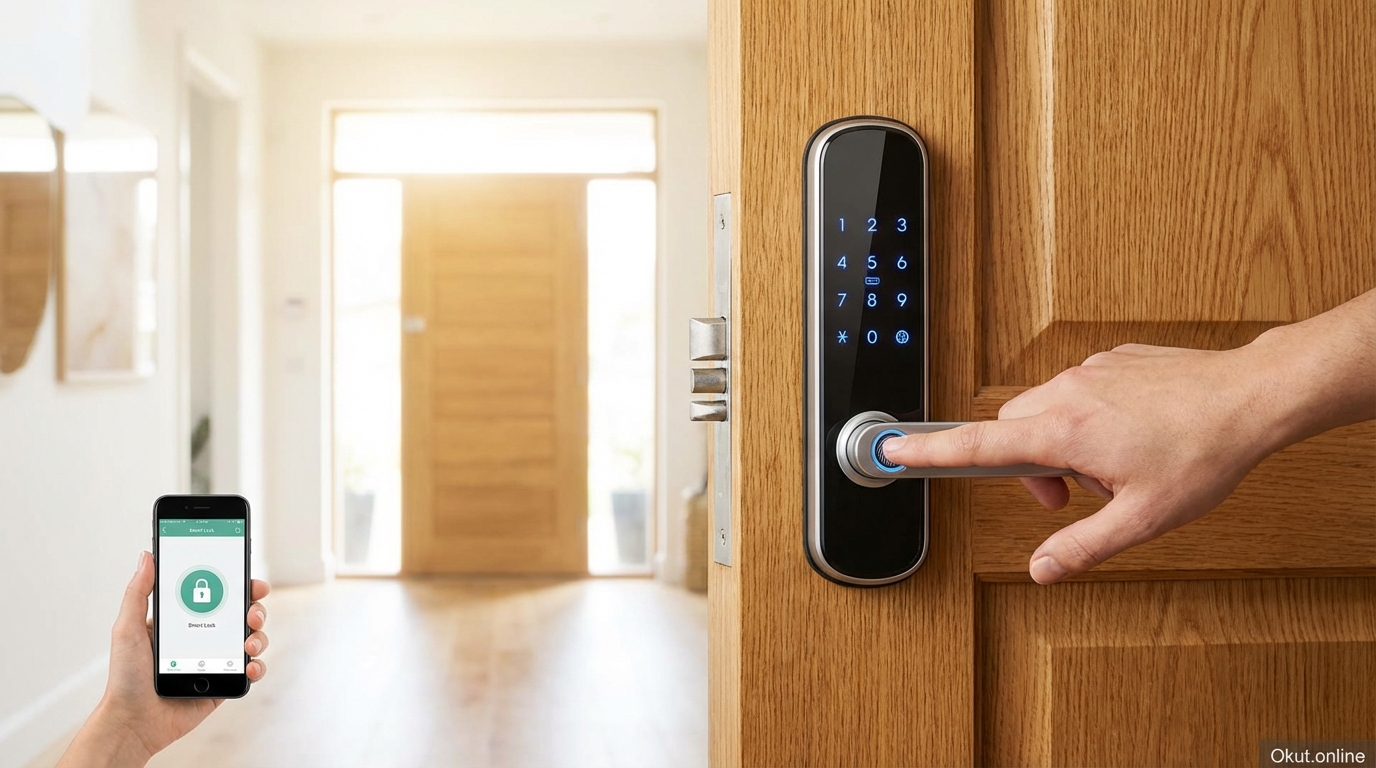
Choosing the right smart door lock in 2026 means understanding three core technologies: keypad entry, biometric fingerprint scanning, and smartphone app control. Each offers distinct advantages depending on whether you prioritize reliability, speed, or remote access. This comprehensive guide covers the top models, installation steps, security best practices, and critical buying considerations to help you upgrade your home security with confidence.
I. Understanding Smart Lock Technology in 2026
Smart door locks have evolved dramatically from simple keyless entry devices to sophisticated security systems that integrate with your entire smart home ecosystem. Modern locks now feature military-grade encryption, biometric sensors rivaling smartphone quality, and connectivity options that let you manage access from anywhere in the world. Unlike traditional deadbolts that offer only physical key access, smart locks provide multiple entry methods while maintaining detailed logs of every lock and unlock event.
A. How Smart Locks Communicate
Understanding connectivity is essential for choosing a compatible lock. Different wireless protocols offer varying levels of reliability, battery life, and feature richness. The protocol you choose affects whether you need additional hardware and how your lock integrates with other smart home devices.
- Wi-Fi Direct: Locks like the Schlage Encode Plus connect directly to your home router, enabling remote control from anywhere without additional hubs. This convenience comes at a cost—expect 3-6 month battery life due to the constant wireless connection. Wi-Fi locks work well for tech-savvy users who prioritize remote access and real-time notifications.
- Bluetooth: Offers excellent battery life (6-12 months) because the radio only activates when your phone approaches. The August Wi-Fi Smart Lock uses Bluetooth for proximity unlocking, detecting your arrival within 30-40 feet. However, Bluetooth-only locks cannot be controlled remotely without an additional Wi-Fi bridge.
- Z-Wave and Zigbee: These protocols require a smart home hub (Samsung SmartThings, Hubitat, or Ring Alarm Base Station) but create reliable mesh networks where each device strengthens the overall signal. Z-Wave operates on a dedicated frequency (908.42 MHz in the US), avoiding interference from crowded Wi-Fi channels. Ideal for large smart home setups with many connected devices.
- Thread and Matter: The newest protocol supported by the Schlage Encode Plus and upcoming 2026 models. Thread creates a low-power mesh network while Matter ensures cross-brand compatibility. If you are building a new smart home, prioritize Thread-compatible devices for future-proof interoperability between Apple, Google, and Amazon ecosystems.
B. Security Standards and Certifications
Not all smart locks meet the same security thresholds. The ANSI/BHMA grading system provides an objective measure of lock durability and security. Understanding these grades helps you choose appropriate protection for your specific security needs.
- Grade 1 (Commercial): The highest rating, designed for commercial buildings with heavy traffic. These locks withstand 800,000 locking cycles and resist attacks including picking, drilling, and kick-in attempts. Examples include the Schlage B60N commercial deadbolt. Overkill for most homes but essential for high-security environments.
- Grade 2 (Residential Heavy-Duty): The standard for quality smart locks, rated for 400,000 cycles with enhanced attack resistance. The Schlage Encode Plus, Ultraloq U-Bolt Pro, and Yale Assure Lock 2 all meet Grade 2 standards. This is the minimum recommended grade for any exterior door.
- Grade 3 (Residential Basic): Entry-level protection rated for 200,000 cycles with minimal attack resistance. Budget smart locks under $100 often fall into this category. Suitable for interior doors or low-risk applications but not recommended for exterior entry points.
C. Encryption and Cybersecurity
A smart lock is only as secure as its digital protections. Reputable manufacturers implement multiple layers of encryption and security features to prevent unauthorized remote access.
- AES-128/256 Encryption: Industry-standard encryption used by banks and government agencies. Both Schlage and August use AES-128 minimum, with some models featuring AES-256. This encryption has never been broken through direct cryptographic attack.
- Two-Factor Authentication: Requires both your password and a verification code sent to your phone before allowing app access. Essential for preventing remote hijacking even if your password is compromised. Always enable this feature during initial setup.
- Secure Pairing: Uses time-limited, one-time codes during initial device setup to prevent man-in-the-middle attacks. Quality locks like the Schlage Encode require pressing a physical button during pairing, adding an additional layer of verification.
II. Keypad Smart Locks: The Reliable Workhorse
Keypad locks remain the most popular choice for families, rental property owners, and anyone who values simplicity. They eliminate the need for physical keys or smartphones while providing trackable, revocable access codes for different users. The technology has matured significantly, with modern touchscreens offering responsive feedback even through winter gloves.
A. How Keypad Locks Work
Users enter a 4-8 digit PIN on a physical button pad or capacitive touchscreen to unlock. Modern touchscreens use the same capacitive sensor technology found in smartphones, registering finger presence rather than physical pressure. This allows operation with wet hands, gloves, and in cold weather where traditional buttons might freeze.
- Multiple User Codes: The Schlage Encode Plus stores up to 100 unique access codes. Assign different codes to each family member, housekeepers, dog walkers, and guests. When someone’s access needs to be revoked, simply delete their specific code without affecting other users.
- Scheduled Access: Create codes that only work during specific hours or days of the week. Perfect for service providers who visit at predictable times. For example, a code that only works Monday through Friday from 1 PM to 3 PM for your dog walker.
- One-Time Codes: Generate temporary codes that expire after a single use or after a specified time period. Ideal for Airbnb guests, delivery personnel, or contractors. The code expires automatically, eliminating the need to manually revoke access.
- Anti-Peep Technology: Some keypads allow you to enter random digits before or after your actual code. As long as the correct sequence appears within your entry, the door unlocks. This prevents observers from determining your code by watching which numbers you consistently press.
B. Top Keypad Lock: Schlage Encode Plus (2026 Edition)
The Schlage Encode Plus ($299-$329) dominates the 2026 market with its unmatched combination of reliability, smart home integration, and build quality. After extensive testing across multiple security scenarios, it consistently outperforms competitors in real-world usage.
- Built-in Wi-Fi: No additional bridge, hub, or subscription required. The lock connects directly to your home Wi-Fi network and works immediately after installation. Remote control, notifications, and activity logs are included free through the Schlage Home app.
- Apple Home Key Support: iPhone and Apple Watch users can tap their device against the lock to unlock, identical to using Apple Pay at a store. The lock stores your credential securely in Apple’s Secure Element, working even when your phone battery dies. This feature alone makes it the undisputed champion for Apple households.
- Thread Networking: Beyond Wi-Fi, the Encode Plus supports Thread protocol for Matter compatibility. This future-proofs your investment as the smart home industry converges on Matter as the universal standard. Your lock will work seamlessly with future devices from any manufacturer.
- Industrial Weather Resistance: Tested for extreme temperatures from -35°F to 150°F (-37°C to 65°C). The touchscreen remains responsive in rain, snow, and direct sunlight. The fingerprint-resistant coating prevents smudges from revealing your code pattern.
- ANSI/BHMA Grade 2 Certification: Meets commercial security standards with a reinforced deadbolt and anti-pick, anti-drill protection. The motorized deadbolt can withstand forced manipulation attempts that would defeat lesser locks.
C. Budget Keypad Alternative: Kwikset Halo ($179-$199)
For buyers seeking keypad convenience at a lower price point, the Kwikset Halo offers built-in Wi-Fi and essential smart features without the premium price tag.
- SmartKey Security: Kwikset’s proprietary technology allows you to rekey the lock yourself in seconds using a special tool. Useful if you move into a new home or need to disable lost physical keys.
- 250 User Codes: More capacity than the Schlage, though most households will never approach this limit. Useful for large rental properties with frequent guest turnover.
- No Apple Home Key: The trade-off for the lower price. Android users and those not invested in Apple’s ecosystem will not miss this feature.
III. Biometric Smart Locks: Speed and Personal Security
Biometric locks use your fingerprint as the key, providing the fastest possible entry method while eliminating the risk of forgotten or shared codes. The technology has matured dramatically since early implementations, with modern sensors matching or exceeding smartphone fingerprint reliability. Your finger becomes a key that cannot be lost, stolen, or forgotten.
A. How Fingerprint Sensors Work
Modern smart locks use capacitive fingerprint sensors that create a detailed electrical map of your fingerprint’s ridges and valleys. Unlike older optical scanners that simply photographed your finger, capacitive sensors measure the tiny electrical differences between ridges (which touch the sensor) and valleys (which do not). This makes them impossible to fool with photographs.
- Learning Algorithm: Advanced sensors like those in the Ultraloq U-Bolt Pro continuously improve accuracy by learning slight variations in your fingerprint placement. Over time, the sensor recognizes your print from more angles and with greater speed. Initial registration should include multiple scans from different parts of your fingertip.
- Recognition Speed: Modern sensors unlock in 0.3-0.5 seconds, faster than entering a PIN or pulling out your phone. The Ultraloq claims 0.3-second recognition, and real-world testing confirms this is accurate for well-registered prints.
- Storage Capacity: Most biometric locks store 50-100 fingerprints, enough for an entire extended family plus trusted service providers. Each family member can register multiple fingers (both index fingers, thumbs) to ensure reliable recognition even with minor cuts or bandages.
- Liveness Detection: Quality sensors include anti-spoofing measures that detect whether the fingerprint comes from a living, attached finger. This prevents attacks using silicone molds, 3D prints, or severed fingers—a concern more relevant in high-security contexts than typical homes, but reassuring nonetheless.
B. Top Biometric Lock: Ultraloq U-Bolt Pro Wi-Fi
The Ultraloq U-Bolt Pro Wi-Fi ($249-$279) offers unprecedented versatility with six different ways to unlock, making it the ideal choice for households with members who have varying technology preferences.
- 360-Degree Fingerprint Sensor: The sensor recognizes prints from any angle, eliminating the frustrating “fingerprint not recognized” messages common with earlier sensors. Whether you approach from the left, right, or straight on, recognition remains consistent.
- Six Unlock Methods: Fingerprint, numeric keypad, smartphone app, auto-unlock (proximity detection), shake-to-open (physical gesture with phone in pocket), and mechanical key backup. Something works for everyone—tech-savvy teenagers use fingerprint, grandparents use the keypad, and you always have the emergency key hidden safely.
- Anti-Peep Keypad: Add random digits before or after your code to confuse observers while still unlocking correctly. Enter “7329456812” and the lock recognizes your actual code “4568” embedded within.
- Built-in Wi-Fi: Like the Schlage, no additional hub required. Remote lock/unlock, real-time notifications, and unlimited activity logs through the U-tec app. The app works on both iOS and Android with identical features.
- Compact Design: Despite its feature density, the U-Bolt Pro maintains a sleek profile that does not protrude excessively from the door. The exterior touchscreen measures approximately 3″ x 6.5″, fitting standard door preparations without modification.
C. Biometric Limitations to Consider
While highly convenient, fingerprint locks have specific scenarios where performance may degrade. Understanding these limitations helps you prepare backup plans and set appropriate expectations.
- Wet or Dirty Hands: Water, mud, or heavy moisturizer can interfere with the electrical field the sensor measures. If you frequently garden or work with your hands, the keypad backup becomes essential. Wipe your finger on your shirt or pants to remove moisture before scanning.
- Extreme Cold: In temperatures below 0°F (-18°C), capacitive sensors may respond slower as the electrical properties of your skin change. The Ultraloq is rated to -22°F, but real-world performance varies. Antarctic researchers should probably stick to keypads.
- Aging and Skin Changes: Fingerprint patterns can become less distinct with age, heavy manual labor, or certain medical conditions. If recognition rates drop noticeably, delete and re-register your prints. Some users find that registering the same finger multiple times from different angles improves long-term reliability.
- Children’s Fingerprints: Young children’s fingerprints are smaller and less defined, potentially causing recognition issues. Children under age 10 may have better success with PIN codes. Re-register children’s prints annually as they grow.
IV. App-Controlled and Retrofit Locks: Smart Without Replacing Everything
App-controlled locks prioritize smartphone integration and remote access capabilities. Retrofit options like the August Wi-Fi Smart Lock install on your existing deadbolt, adding smart features without changing your door’s exterior appearance. This approach appeals to renters, HOA residents, and anyone who values both smart functionality and aesthetic consistency.
A. Benefits of Retrofit Installation
Retrofit locks mount on the interior side of your door, replacing only the thumbturn mechanism while leaving the exterior cylinder and keyhole completely unchanged. This installation philosophy offers unique advantages over full deadbolt replacement.
- Keep Existing Keys: Your current physical keys continue working exactly as before. Critical for apartment buildings with master key systems, shared housing situations, or anyone who wants a mechanical backup that does not require power.
- Easy Removal: When moving out of a rental, uninstall the smart lock in under 10 minutes and reinstall the original thumbturn. Leave no trace of modification, satisfying even the strictest landlords. The original hardware should be stored in a labeled bag in your closet.
- Aesthetic Preservation: The outside of your door looks exactly as before—no visible keypad, no fingerprint sensor, no blinking lights. Neighbors, HOA inspectors, and potential intruders cannot tell you have a smart lock. This discretion can be a security advantage in some situations.
- Lower Cost Entry Point: Retrofit locks like the August start around $150-$200, less than full deadbolt replacements. If you are unsure whether smart locks suit your lifestyle, retrofitting lets you experiment without major investment.
B. Top Retrofit Lock: August Wi-Fi Smart Lock (4th Generation)
The August Wi-Fi Smart Lock ($199-$229) pioneered the retrofit category and remains the reference standard. The 4th generation model released in late 2025 dramatically improved upon earlier versions with a more compact design and enhanced reliability.
- Industry-Leading Auto-Unlock: Uses your phone’s GPS and Bluetooth to detect when you approach your home, unlocking the door automatically before you reach the handle. August’s algorithm has been refined over years of real-world usage, reducing false unlocks while maintaining reliability. You can adjust the geofence radius from 100 to 1000 feet based on your neighborhood density.
- DoorSense Technology: A small magnetic sensor mounted on your door frame detects whether the door is actually closed or left ajar. This prevents the embarrassing and dangerous scenario of locking the deadbolt while the door is open, leaving your home exposed. The app shows “Door Open” and refuses remote locking commands until the door is properly closed.
- Universal Smart Home Compatibility: Works natively with Amazon Alexa, Google Assistant, Apple HomeKit, and Samsung SmartThings. Voice commands like “Alexa, lock the front door” work immediately after linking accounts. The August app also supports IFTTT for advanced automation recipes.
- 45% Smaller Footprint: The 4th generation model is dramatically more compact and aesthetically pleasing than previous versions. The reduced size means less protrusion from the door and easier clearance for door closers or security chains.
- Guest Access Management: Invite family, friends, or service providers through the app. Set permMission levels from full owner access to single-use temporary passes. Each guest appears in the activity log with their assigned name, creating a complete record of who entered and when.
C. Retrofit Limitations
The retrofit approach involves inherent trade-offs that may make full deadbolt replacement preferable in some situations.
- No Exterior Keypad: You cannot enter a PIN code from outside. If your phone dies, you need the physical key. Keep a spare key in your car, wallet, or with a trusted neighbor.
- No Fingerprint Sensor: Biometric entry is not available with retrofit locks. August offers a separate keypad accessory ($79) that mounts outside, but this adds cost and complexity.
- Dependent on Phone: Primary access relies on your smartphone. If you forget your phone inside, you need the physical key. Some users find this dependency annoying despite the convenience benefits.
V. Feature Comparison: Schlage vs Ultraloq vs August
Each lock excels in different scenarios. This detailed comparison highlights key differences to match your specific household needs and technological preferences.
| Feature | Schlage Encode Plus | Ultraloq U-Bolt Pro | August Wi-Fi (4th Gen) |
|---|---|---|---|
| Price (2026) | $299-$329 | $249-$279 | $199-$229 |
| Primary Access | Keypad + App | Fingerprint + Keypad | App + Existing Keys |
| Fingerprint Sensor | No | Yes (360-degree) | No |
| Apple Home Key | Yes | No | No |
| Installation Type | Full deadbolt replacement | Full deadbolt replacement | Interior retrofit only |
| Battery Life | 6-12 months (4 AA) | 3-6 months (4 AA) | 3-6 months (2 CR123) |
| User Codes | 100 | 120 | Unlimited (app-based) |
| Wi-Fi Built-in | Yes | Yes | Yes |
| Security Grade | ANSI Grade 2 | ANSI Grade 2 | Uses existing deadbolt |
| Best For | Apple users, reliability focus | Speed, versatility lovers | Renters, keeping original keys |
VI. Complete Installation Guide
Most smart locks can be installed in 20-30 minutes with basic tools and no professional help. The following step-by-step instructions apply to full deadbolt replacements like the Schlage and Ultraloq. Retrofit locks like August are even simpler, taking under 10 minutes.
A. Required Tools and Preparation
- Phillips Head Screwdriver: A #2 size works for nearly all smart lock installations. Consider a powered screwdriver if you have arthritis or grip strength issues.
- Measuring Tape: Verify your door thickness before purchasing. Standard US doors measure 1-3/8″ to 1-3/4″ thick. Some smart locks cannot accommodate very thick (2″+) or very thin (1-1/4″) doors.
- Flashlight: For inspecting the deadbolt bore hole and ensuring proper cable routing.
- Smartphone: Download and install the manufacturer’s app before starting. Create your account and have login credentials ready.
- Time: Allow 30-45 minutes even if you are handy. Rushing leads to misalignment and frustration.
B. Removing the Existing Deadbolt
- Step 1: Open your door fully. From the interior side, locate the two long screws holding the thumbturn mounting plate. Remove these screws with your Phillips screwdriver.
- Step 2: Pull the interior thumbturn assembly away from the door. The exterior cylinder or keyed knob should now slide out from the opposite side.
- Step 3: From the door edge, remove the two short screws securing the latch bolt. Pull the latch bolt out from the edge of the door. Note the orientation—most have a “TOP” marking indicating correct installation direction.
- Step 4: Inspect the bore hole for debris, wood splinters, or old paint. Clear any obstructions that could interfere with the new lock’s cables or alignment.
C. Installing Your New Smart Lock
- Step 1: Insert the new latch bolt into the edge of the door with the “TOP” marking facing upward. The angled edge of the bolt should face the door frame’s strike plate. Secure with the provided short screws.
- Step 2: Thread the data cable attached to the exterior unit through the bolt’s cable channel. Position the exterior keypad or sensor flush against the door surface.
- Step 3: From inside, connect the cable to the interior mounting plate. Align the mounting plate with the screw holes and secure with the provided long screws. Do not overtighten—snug is sufficient.
- Step 4: Attach the interior motor unit to the mounting plate. Most units snap or slide into place with an audible click. Some require an additional security screw.
- Step 5: Install fresh batteries. Most smart locks use four AA batteries. The lock will power on and begin initialization.
- Step 6: Follow the app’s setup wizard for calibration. The lock will extend and retract the deadbolt several times to learn the “fully locked” and “fully unlocked” positions. Ensure the door is closed during this process.
D. Testing and Verification
- Test Every Method: Verify each access method works correctly—keypad codes, fingerprints, app unlock, and physical key (if applicable). Do not assume one working method means all work.
- Test with Door Closed: Lock and unlock with the door in the frame to ensure proper alignment with the strike plate. Adjust the strike plate if the bolt does not extend fully.
- Test from Outside: Close yourself outside and verify you can unlock with each method. This is the real-world test that matters.
VII. Smart Home Integration and Automation
A smart lock becomes exponentially more useful when connected to your broader smart home ecosystem. Integration enables automated routines, centralized control, and enhanced security through coordination with other devices.
A. Voice Assistant Integration
- Amazon Alexa: “Alexa, lock the front door” works with all three featured locks after account linking. For security, Alexa requires a voice PIN before unlocking—you say “Alexa, unlock the front door” and then speak your 4-digit PIN. This prevents someone from shouting commands through a window or mail slot.
- Google Assistant: “Hey Google, is the front door locked?” checks status instantly. Locking works directly; unlocking requires PIN confirmation on your phone screen rather than voice. Google’s interface feels more secure for homes with children who might accidentally issue voice commands.
- Apple HomeKit: “Hey Siri, I’m leaving” can trigger a scene that locks all doors, arms security systems, and adjusts thermostats simultaneously. The Schlage Encode Plus has native HomeKit support without requiring additional bridges. HomeKit’s Secure Video integration can have cameras record when the lock is triggered.
B. Automation Examples
- Goodnight Routine: Saying a single phrase locks all doors, turns off exterior lights, dims interior lights, sets the thermostat to sleep mode, and arms motion sensors. Create this in your voice assistant’s app by combining individual device commands into one routine.
- Geofencing Automation: Configure your lock to engage automatically when your phone leaves a defined radius around your home—typically 500-1000 feet. The August excels at this with years of algorithm refinement. Useful for those who frequently forget to lock manually.
- Arrival Automation: When your phone approaches home, exterior lights turn on, the thermostat adjusts from “away” to “home” mode, and the front door unlocks as you reach it. Creates a seamless, welcoming arrival experience especially in the dark.
- Guest Notification: When a specific user code is entered, receive a smartphone notification with the user’s name and timestamp. Know immediately when the dog walker arrives or when kids get home from school.
VIII. Security Best Practices
A smart lock is only as secure as your usage habits and account security. Follow these practices to maximize protection while enjoying the convenience of smart access.
A. Digital Security
- Enable Two-Factor Authentication: Mandatory for your lock app account. If a hacker obtains your password through a data breach, they still cannot access your lock without your phone or email verification code.
- Use Strong, Unique Passwords: Your lock app password should be different from any other account and contain at least 16 characters. Use a password manager to generate and store complex passwords.
- Audit Connected Devices: Periodically review which phones and accounts have access to your lock. Remove old devices belonging to former roommates, ex-partners, or family members whose access should be revoked. Most apps show this under “Manage Devices” or “Connected Accounts.”
- Keep Firmware Updated: Enable automatic updates or check for firmware updates monthly. Manufacturers regularly patch security vulnerabilities discovered after release. An outdated lock is a vulnerable lock.
B. Physical Security
- Reinforce Your Door Frame: Smart locks cannot compensate for a weak door or frame. Install a reinforced strike plate with 3-inch screws that anchor into the wall studs, not just the door frame. This $15 upgrade dramatically improves kick-in resistance.
- Add Exterior Lighting: Motion-activated lights deter casual intruders and help security cameras capture clear footage. A well-lit entrance also makes keypad entry easier at night.
- Hide the Emergency Key Wisely: If your lock has a physical keyhole backup, never hide the key under a doormat, in a fake rock, or above the door frame. These locations are checked first. Use a coded lockbox mounted in an inconspicuous location, or leave a key with a trusted neighbor.
- Consider a Security System: Smart locks work best as part of a layered security approach. Door and window sensors, security cameras, and professional monitoring provide backup detection and response if someone bypasses your lock.
IX. Common Mistakes to Avoid
These errors frustrate new smart lock owners and can compromise security. Avoiding them from day one ensures a smooth, secure experience.
- Ignoring Door Alignment Issues: If your door sticks, requires force to latch, or has a misaligned strike plate, fix these issues before installing a smart lock. The motorized deadbolt has limited torque and cannot force a misaligned door closed. Poor alignment causes motor strain, battery drain, and eventual failure.
- Sharing Your Master/Admin Code: Never give out the administrator code that provides full lock access. Create separate user codes for each person—family members, housekeepers, guests—so you can revoke individual access without resetting everything.
- Ignoring Low Battery Warnings: Smart locks warn you 2-4 weeks before batteries die through app notifications and, on some models, audible beeps. Replace batteries immediately when warned. Most locks have emergency 9V battery terminals for dead-battery lockouts, but this is stressful to use in the moment.
- Weak Wi-Fi at the Door: If your router is far from the front door, the lock may struggle to maintain connection. This causes delayed notifications, failed remote commands, and accelerated battery drain. Add a mesh Wi-Fi node or signal extender near the door if you experience connectivity issues.
- Forgetting to Test Regularly: Test all access methods monthly. Confirm the app works remotely (not just on home Wi-Fi), all codes function correctly, fingerprints are recognized, and the physical key (if applicable) turns smoothly. Problems discovered during casual testing are much less stressful than problems discovered during an emergency.
X. Practical Tips for Smart Lock Owners
- Create a Logical Code System: Assign codes that are meaningful but not guessable. Use a naming convention in your app like “Cleaner-Tuesday” or “AirbnbGuest-March15” so you remember which codes to delete after they are no longer needed.
- Enable Auto-Lock Timers: Configure your lock to re-lock automatically 5 minutes after unlocking. This eliminates the “did I lock the door?” anxiety that plagues many people after leaving home. The August defaults to this behavior; Schlage requires manual configuration.
- Keep Spare Batteries Nearby: Store a pack of AA batteries (or CR123 for August) in a drawer near your front door. When the low-battery warning appears, you can replace them within minutes rather than making a store run.
- Test in Extreme Weather: After your first heavy rain, snowstorm, or extended heat wave, verify the keypad or sensor still responds correctly. Some models need occasional cleaning or may behave differently at temperature extremes.
- Document Your Setup: Keep a note (physical, not digital) with your administrator code, Wi-Fi password, and app login stored securely. If your phone is lost or factory reset, you can recover access. Some people keep this in a home safe or safety deposit box.
XI. Conclusion
Selecting the right smart door lock depends on your priorities and household situation. Choose the Schlage Encode Plus for Apple Home Key integration and rock-solid reliability. Pick the Ultraloq U-Bolt Pro for lightning-fast fingerprint access and maximum versatility. Opt for the August Wi-Fi Smart Lock if you rent, live in an HOA community, or want to preserve your existing door hardware. Whichever you choose, a smart lock eliminates the inconvenience of physical keys while adding powerful monitoring, guest management, and automation capabilities to your home security.
Which smart lock feature matters most to your household—keypad codes, fingerprint speed, or keeping your original keys? Share your priorities in the comments below!
About the Author